Comparativa de los mejores asistentes de ventas con IA en tiempo real en 2026
Siete herramientas que te ayudan durante la llamada de ventas, no después. Qué te ofrece cada una al instante, cuánto cuesta, qué necesita y para qué vendedor encaja mejor.
A real-time AI sales assistant helps during the call, while the buyer is still talking. That rules out most of what gets sold as “sales AI”: notetakers like Fathom and Granola, conversation intelligence like Gong, and recap tools like Microsoft’s Sales agent all work after the call. They are useful. They are not on this list.
Seven products are. Prices, free plans and platforms below were checked against each vendor’s own site on 23 September 2026, the same check behind our comparison pages.
How to judge a live assistant
Four questions separate them, and the first one matters most.
- What does it hand you? A hint to interpret, a battle card to skim, or the sentence itself. Anything short of the sentence still has to be turned into speech, and composing a sentence is exactly what you have no time for.
- Does it know the buyer? A reply that mentions the buyer’s own business lands. A generic rebuttal is the one they have heard from every vendor this quarter.
- How fast is it? Past about three seconds, you stop looking at it.
- What does it need? A desktop app, an admin, a bot in the meeting, or a specific CRM. For a small team, each one is a week of delay.
At a glance
| Tool | What you get during the call | Platforms | Free plan |
|---|---|---|---|
| Axelize | The reply itself, in your voice | Google Meet | No |
| SalesGhost | Suggestions from your docs and playbooks | Zoom, Meet, Teams, Slack Huddles | 5 live calls a month |
| SalesViking | Suggestions processed on the Mac | Zoom, Meet, Teams, on macOS | Free forever |
| Nomi | Battle cards and CRM writeback | Zoom, Meet, Teams | A free start, limits not published |
| Cluely | A general-purpose overlay | Any call | Limited |
| SalesEcho | Live coaching plus roleplay practice | Meet, Zoom, Teams, Webex, GoTo, phone | A $1 three-day trial |
| Convo | Live answers from a desktop app | Zoom, Meet, Teams, Webex | None published |
Axelize: the sentence itself, in your voice
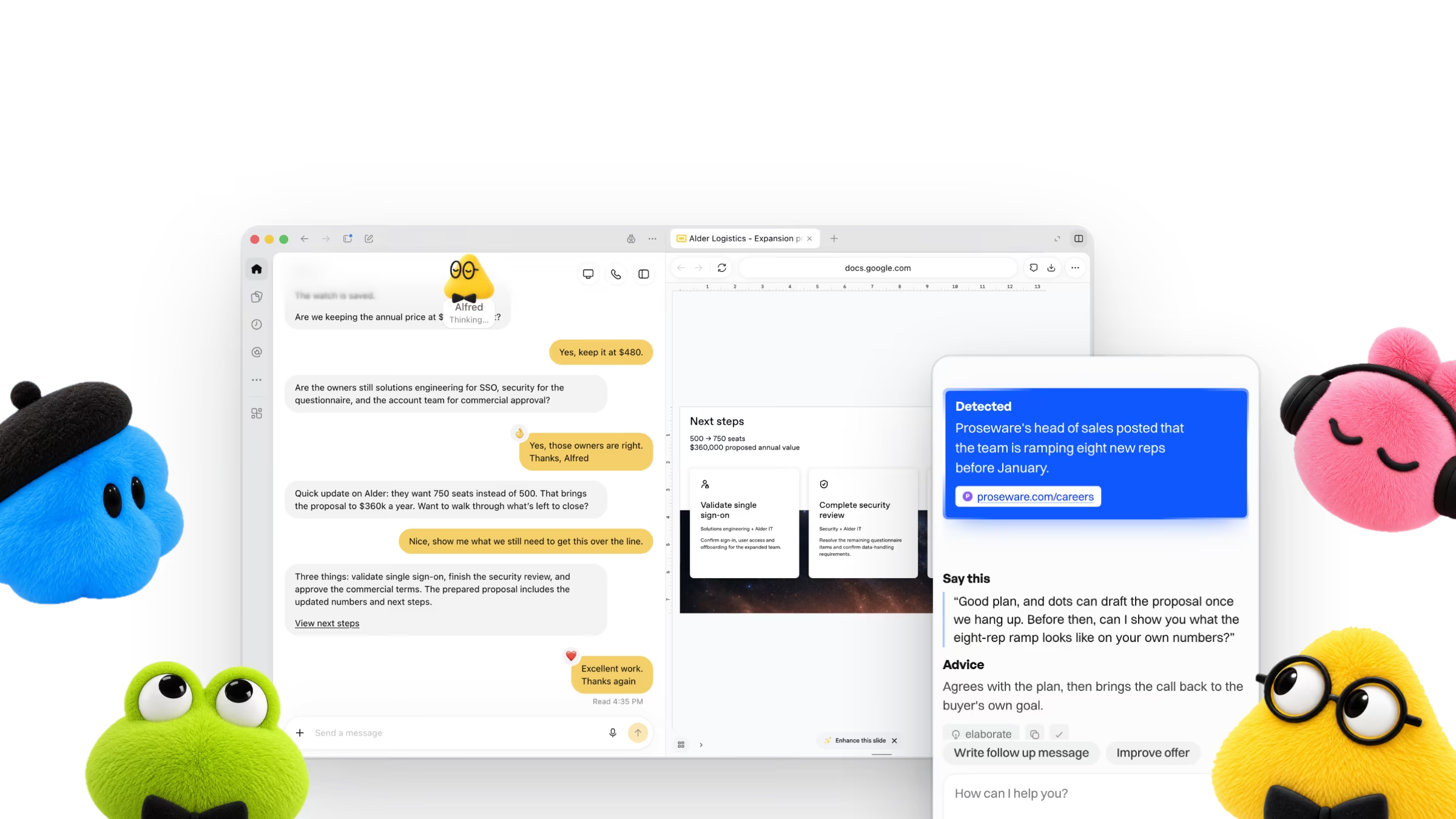
Axelize is a browser extension that sits beside the call. It reads the live captions, pulls the one fact about the account that matters, and writes your next sentence in the way you actually speak. There is nothing to reword, because the output is the reply, not advice about the reply. No bot joins the meeting and no audio or video is recorded.
It also does the research before the call. The account’s website, your products, your contacts and your previous meetings are loaded into the prompt ahead of time, so when the objection lands it is choosing a fact, not starting a search.
On a demo call, Miriam Graham from Proseware says: “Can you just send me a deck and I'll share it around?” Axelize finds: Proseware's head of sales posted that the team is ramping eight new reps before January. It suggests: “Happy to. Since you're ramping eight reps before January, would it help if the deck showed what a new rep's first month looks like with this?” Agrees to the request, then ties the deck to the goal the buyer already announced, so it gets read.

Best for: founders and sellers who want the words, not a prompt to interpret. Skip it if: your calls run on Zoom or Teams today, or you need a free plan. Axelize works with Google Meet today, with Zoom and Microsoft Teams on the roadmap, and every plan is paid. Current prices are on the pricing page.
SalesGhost: live coaching across four platforms
A desktop app for macOS and Windows that listens to the audio on your computer and surfaces suggestions from your documents, playbooks and CRM. It covers Zoom, Google Meet, Microsoft Teams and Slack Huddles, and it hides from screen share.
It starts at $24.17 per user per month on its Personal plan, billed annually at $290, and its free tier includes 5 live calls a month. The suggestions are coaching to work from rather than a sentence to say. Axelize vs SalesGhost.
SalesViking: private by design, on the Mac
A native macOS app, 14.4 or later on Apple Silicon, that processes the call on the device, so no audio goes to the cloud. It works on Zoom, Google Meet and Teams, and its free tier puts no cap on calls. Pro is $49 per seat per month.
The limit is the platform: nobody on Windows can use it. Axelize vs SalesViking.
Nomi: battle cards when a rival comes up
A floating overlay for Zoom, Google Meet and Teams that fires a battle card when a competitor is named, and writes back to Salesforce, HubSpot and Pipedrive after the call. It suits teams that already maintain a battle-card library.
It starts at $89 per user per month, billed annually, the highest published entry price among the rivals here. Axelize vs Nomi.
Cluely: one overlay for every kind of call
A general-purpose desktop overlay that answers from what it hears and what you upload, on any call in any app. It is the cheapest paid option at $19.99 a month, with a limited free plan.
It is not built for sales: it does not research the account or read your CRM, and staying hidden from screen share costs $149.99 a month. Axelize vs Cluely.
SalesEcho: coaching plus practice
Live coaching across the widest set of platforms here, Google Meet, Zoom, Teams, Webex, GoTo and phone, plus roleplay against AI buyers between calls. It costs $29 a month, marked as a launch price, after a $1 three-day trial.
Convo: live answers from a desktop app
A Mac and Windows app that never joins the call and covers Zoom, Google Meet, Teams and Webex. It starts at $22.49 per user per month billed annually, but live answers come with the $52.49 Professional seat.
Why the live moment matters most for newer sellers
The strongest evidence for live AI help comes from outside sales, and it is worth knowing what it does and does not say.
+34%
If you have run the same call a thousand times, you already know the answer. If you are a founder running your own sales calls, or a seller still building your answers, the few seconds after an objection are where live help earns its price.
Which one to pick
- You want the words, not a hint: Axelize. It is the only one here that writes the reply itself, in your voice.
- You sell across Zoom, Teams and Slack in the same week: SalesGhost.
- You are on a Mac and audio must never leave it: SalesViking.
- Your deals turn on competitor mentions: Nomi.
- You want one assistant for every call, not only sales: Cluely.
- You want roleplay practice as well: SalesEcho.